# CodeLlama Server: Streaming, Caching, Model Fallbacks (OpenAI + Anthropic), Prompt-tracking
Works with: Anthropic, Huggingface, Cohere, TogetherAI, Azure, OpenAI, etc.
[](https://pypi.org/project/litellm/)
[](https://pypi.org/project/litellm/0.1.1/)

[](https://railway.app/template/HuDPw-?referralCode=jch2ME)
**LIVE DEMO** - https://litellm.ai/playground
## What does CodeLlama Server do
- Uses Together AI's CodeLlama to answer coding questions, with GPT-4 + Claude-2 as backups (you can easily switch this to any model from Huggingface, Replicate, Cohere, AI21, Azure, OpenAI, etc.)
- Sets default system prompt for guardrails `system_prompt = "Only respond to questions about code. Say 'I don't know' to anything outside of that."`
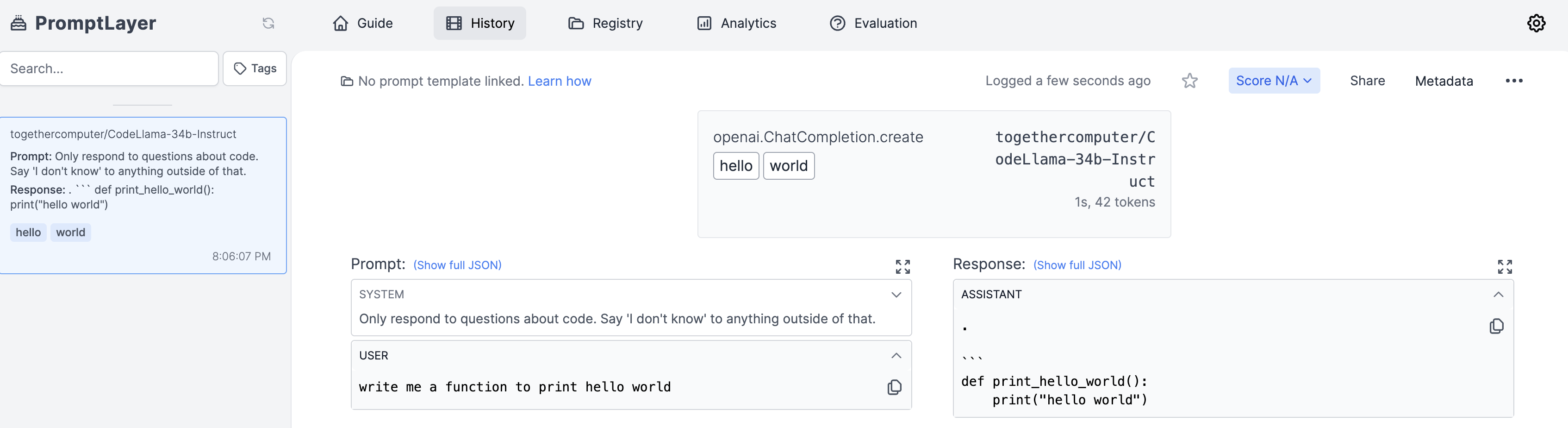
- Integrates with Promptlayer for model + prompt tracking
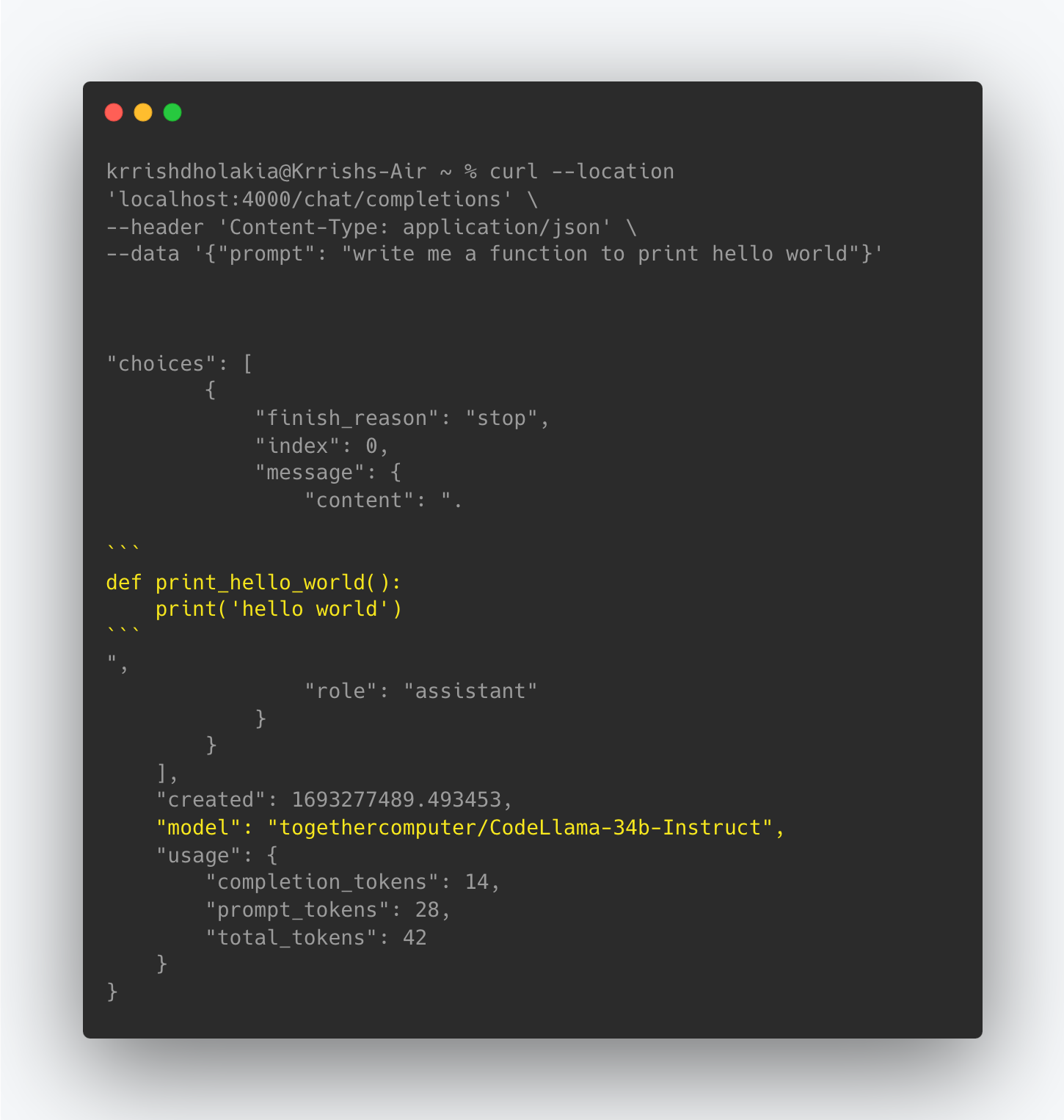
- Example output
 - **Consistent Input/Output** Format
- Call all models using the OpenAI format - `completion(model, messages)`
- Text responses will always be available at `['choices'][0]['message']['content']`
- Stream responses will always be available at `['choices'][0]['delta']['content']`
- **Error Handling** Using Model Fallbacks (if `CodeLlama` fails, try `GPT-4`) with cooldowns, and retries
- **Prompt Logging** - Log successful completions to promptlayer for testing + iterating on your prompts in production! (Learn more: https://litellm.readthedocs.io/en/latest/advanced/
**Example: Logs sent to PromptLayer**
- **Consistent Input/Output** Format
- Call all models using the OpenAI format - `completion(model, messages)`
- Text responses will always be available at `['choices'][0]['message']['content']`
- Stream responses will always be available at `['choices'][0]['delta']['content']`
- **Error Handling** Using Model Fallbacks (if `CodeLlama` fails, try `GPT-4`) with cooldowns, and retries
- **Prompt Logging** - Log successful completions to promptlayer for testing + iterating on your prompts in production! (Learn more: https://litellm.readthedocs.io/en/latest/advanced/
**Example: Logs sent to PromptLayer**
 - **Token Usage & Spend** - Track Input + Completion tokens used + Spend/model - https://docs.litellm.ai/docs/token_usage
- **Caching** - Provides in-memory cache + GPT-Cache integration for more advanced usage - https://docs.litellm.ai/docs/caching/gpt_cache
- **Streaming & Async Support** - Return generators to stream text responses - TEST IT 👉 https://litellm.ai/
## API Endpoints
### `/chat/completions` (POST)
This endpoint is used to generate chat completions for 50+ support LLM API Models. Use llama2, GPT-4, Claude2 etc
#### Input
This API endpoint accepts all inputs in raw JSON and expects the following inputs
- `prompt` (string, required): The user's coding related question
- Additional Optional parameters: `temperature`, `functions`, `function_call`, `top_p`, `n`, `stream`. See the full list of supported inputs here: https://litellm.readthedocs.io/en/latest/input/
#### Example JSON body
For claude-2
```json
{
"prompt": "write me a function to print hello world"
}
```
### Making an API request to the Code-Gen Server
```python
import requests
import json
url = "localhost:4000/chat/completions"
payload = json.dumps({
"prompt": "write me a function to print hello world"
})
headers = {
'Content-Type': 'application/json'
}
response = requests.request("POST", url, headers=headers, data=payload)
print(response.text)
```
### Output [Response Format]
Responses from the server are given in the following format.
All responses from the server are returned in the following format (for all LLM models). More info on output here: https://litellm.readthedocs.io/en/latest/output/
```json
{
"choices": [
{
"finish_reason": "stop",
"index": 0,
"message": {
"content": ".\n\n```\ndef print_hello_world():\n print(\"hello world\")\n",
"role": "assistant"
}
}
],
"created": 1693279694.6474009,
"model": "togethercomputer/CodeLlama-34b-Instruct",
"usage": {
"completion_tokens": 14,
"prompt_tokens": 28,
"total_tokens": 42
}
}
```
## Installation & Usage
### Running Locally
1. Clone liteLLM repository to your local machine:
```
git clone https://github.com/BerriAI/litellm-CodeLlama-server
```
2. Install the required dependencies using pip
```
pip install requirements.txt
```
3. Set your LLM API keys
```
os.environ['OPENAI_API_KEY]` = "YOUR_API_KEY"
or
set OPENAI_API_KEY in your .env file
```
4. Run the server:
```
python main.py
```
## Deploying
1. Quick Start: Deploy on Railway
[](https://railway.app/template/HuDPw-?referralCode=jch2ME)
2. `GCP`, `AWS`, `Azure`
This project includes a `Dockerfile` allowing you to build and deploy a Docker Project on your providers
# Support / Talk with founders
- [Our calendar 👋](https://calendly.com/d/4mp-gd3-k5k/berriai-1-1-onboarding-litellm-hosted-version)
- [Community Discord 💭](https://discord.gg/wuPM9dRgDw)
- Our numbers 📞 +1 (770) 8783-106 / +1 (412) 618-6238
- Our emails ✉️ ishaan@berri.ai / krrish@berri.ai
## Roadmap
- [ ] Implement user-based rate-limiting
- [ ] Spending controls per project - expose key creation endpoint
- [ ] Need to store a keys db -> mapping created keys to their alias (i.e. project name)
- [ ] Easily add new models as backups / as the entry-point (add this to the available model list)
- **Token Usage & Spend** - Track Input + Completion tokens used + Spend/model - https://docs.litellm.ai/docs/token_usage
- **Caching** - Provides in-memory cache + GPT-Cache integration for more advanced usage - https://docs.litellm.ai/docs/caching/gpt_cache
- **Streaming & Async Support** - Return generators to stream text responses - TEST IT 👉 https://litellm.ai/
## API Endpoints
### `/chat/completions` (POST)
This endpoint is used to generate chat completions for 50+ support LLM API Models. Use llama2, GPT-4, Claude2 etc
#### Input
This API endpoint accepts all inputs in raw JSON and expects the following inputs
- `prompt` (string, required): The user's coding related question
- Additional Optional parameters: `temperature`, `functions`, `function_call`, `top_p`, `n`, `stream`. See the full list of supported inputs here: https://litellm.readthedocs.io/en/latest/input/
#### Example JSON body
For claude-2
```json
{
"prompt": "write me a function to print hello world"
}
```
### Making an API request to the Code-Gen Server
```python
import requests
import json
url = "localhost:4000/chat/completions"
payload = json.dumps({
"prompt": "write me a function to print hello world"
})
headers = {
'Content-Type': 'application/json'
}
response = requests.request("POST", url, headers=headers, data=payload)
print(response.text)
```
### Output [Response Format]
Responses from the server are given in the following format.
All responses from the server are returned in the following format (for all LLM models). More info on output here: https://litellm.readthedocs.io/en/latest/output/
```json
{
"choices": [
{
"finish_reason": "stop",
"index": 0,
"message": {
"content": ".\n\n```\ndef print_hello_world():\n print(\"hello world\")\n",
"role": "assistant"
}
}
],
"created": 1693279694.6474009,
"model": "togethercomputer/CodeLlama-34b-Instruct",
"usage": {
"completion_tokens": 14,
"prompt_tokens": 28,
"total_tokens": 42
}
}
```
## Installation & Usage
### Running Locally
1. Clone liteLLM repository to your local machine:
```
git clone https://github.com/BerriAI/litellm-CodeLlama-server
```
2. Install the required dependencies using pip
```
pip install requirements.txt
```
3. Set your LLM API keys
```
os.environ['OPENAI_API_KEY]` = "YOUR_API_KEY"
or
set OPENAI_API_KEY in your .env file
```
4. Run the server:
```
python main.py
```
## Deploying
1. Quick Start: Deploy on Railway
[](https://railway.app/template/HuDPw-?referralCode=jch2ME)
2. `GCP`, `AWS`, `Azure`
This project includes a `Dockerfile` allowing you to build and deploy a Docker Project on your providers
# Support / Talk with founders
- [Our calendar 👋](https://calendly.com/d/4mp-gd3-k5k/berriai-1-1-onboarding-litellm-hosted-version)
- [Community Discord 💭](https://discord.gg/wuPM9dRgDw)
- Our numbers 📞 +1 (770) 8783-106 / +1 (412) 618-6238
- Our emails ✉️ ishaan@berri.ai / krrish@berri.ai
## Roadmap
- [ ] Implement user-based rate-limiting
- [ ] Spending controls per project - expose key creation endpoint
- [ ] Need to store a keys db -> mapping created keys to their alias (i.e. project name)
- [ ] Easily add new models as backups / as the entry-point (add this to the available model list)